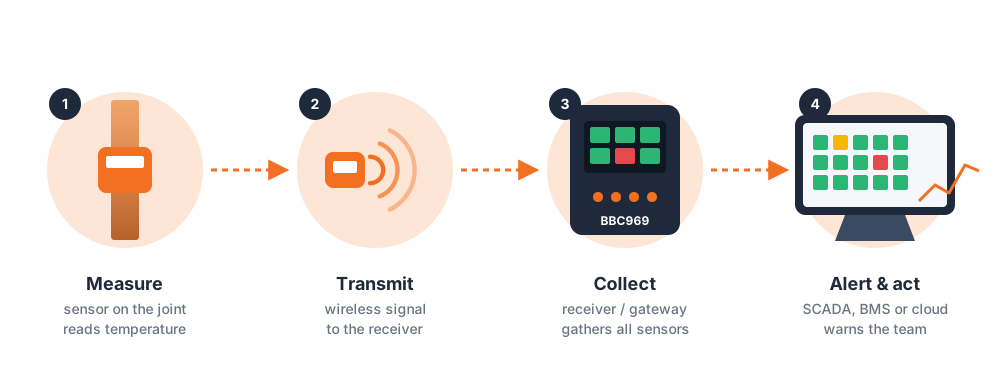
Wireless busbar temperature monitoring is becoming the standard way electrical and facilities teams catch loose joints and hotspots before they turn into outages or arc flash incidents. Whether you're comparing active versus passive sensors or trying to work out how many sensors your switchgear needs, this guide answers the 15 questions asked most often.
1. What Is a Wireless Busbar Temperature Monitoring Sensor, and How Does It Work?
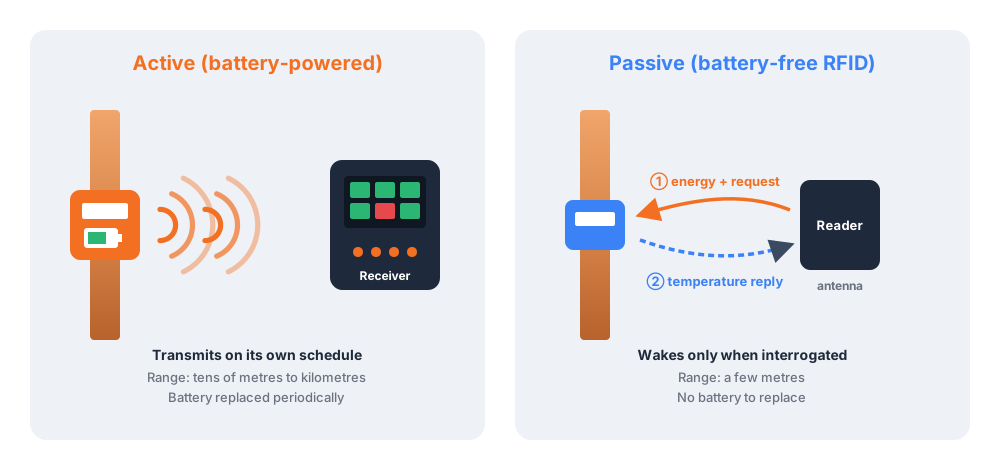
It's a sensor mounted directly at a busbar joint, cable lug, or contact point that measures temperature and reports it wirelessly, with no physical wire running back to a control room. Depending on the design, it either transmits continuously using its own onboard battery, or operates passively, drawing power from an RFID reader's radio signal each time it's interrogated.
2. What Are the Benefits of Wireless Busbar Temperature Monitoring vs. Manual Inspection?
- Continuous coverage — a developing hotspot is flagged within seconds, not at the next scheduled walk-through.
- Fewer panel openings — maintenance teams don't need to repeatedly access energized equipment just to take a manual reading.
- Automatic historical logging — temperature trends are recorded for maintenance planning and compliance audits.
- Lower long-term maintenance cost — especially with battery-free sensors, which remove recurring service visits entirely.
3. What Are the Main Types of Wireless Temperature Sensors Used on Busbars?
Sensors generally fall into two categories:
- Active sensors — battery-powered, transmitting continuously over Wi-Fi, Bluetooth, Zigbee, or LoRa.
- Passive sensors — battery-free, relying on an RFID reader to power the sensor and retrieve a reading.
4. How Do Active and Passive Wireless Sensors Compare for Busbar Monitoring?
| Feature | Active Sensors | Passive (RFID) Sensors |
|---|---|---|
| Power source | Onboard battery | Battery-free, powered by the reader |
| Data transmission | Continuous, independent | On-demand, when interrogated by a reader |
| Typical range | Tens of meters to several kilometers | A few meters, depending on reader placement |
| Maintenance | Periodic battery replacement | None — no battery to replace |
| Best for | Long-range or standalone monitoring points | Busbars and contacts that are hard or risky to access repeatedly |
5. When Should I Choose a Passive RFID Sensor Over a Battery-Powered Sensor for Busbars?
- When battery replacement on a live busbar is impractical or unsafe.
- When the sensor sits inside sealed switchgear with limited physical access.
- When deploying many sensors across a facility and you want to avoid a recurring battery-replacement schedule entirely.
6. What Is the Typical Range and Accuracy of Wireless Busbar Temperature Sensors?
| Technology | Typical Range |
|---|---|
| Wi-Fi-based | 30–100 m indoors, up to ~200 m outdoors |
| Bluetooth / Zigbee | 10–30 m |
| LoRa | Up to several kilometers |
| Passive RFID | A few meters, dependent on reader power and the busbar's metal environment |
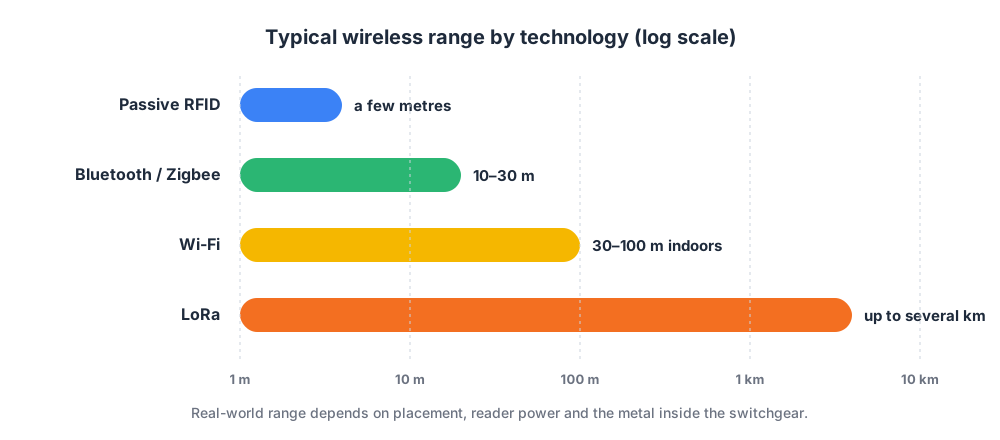
Accuracy for any of these technologies depends heavily on sensor placement, calibration, and interference from nearby metal or electromagnetic noise — so correct installation matters as much as the sensor's rated specification sheet.
7. Can Wireless Sensors Operate Safely on Live, High-Voltage Busbars?
Passive RFID sensors are specifically designed for this use case: they carry no battery, no exposed wiring, and no components that need routine physical access after installation, which reduces how often a panel must be opened. Sensor selection and installation should still follow the manufacturer's voltage rating guidance and your local electrical safety codes.
8. Which Industries Rely Most on Wireless Busbar Temperature Monitoring?
- Utilities & power distribution — substations, RMUs, and distribution panels.
- Manufacturing & heavy industry — main switchboards and motor control centers.
- Semiconductor fabs — power distribution backbones that can't tolerate unplanned downtime.
- Data centers — critical power paths where overheating risks service-level outages.
- Public transportation infrastructure — traction power and signalling systems.
9. How Do You Install a Wireless Busbar Temperature Monitoring Sensor?
- Identify hotspot-prone joints — bolted connections, cable lugs, plug-in contacts.
- Mount the sensor securely at the contact surface using the correct bolt-on, clamp, or nut-style fitting.
- Position the reader and antenna within range of the sensor.
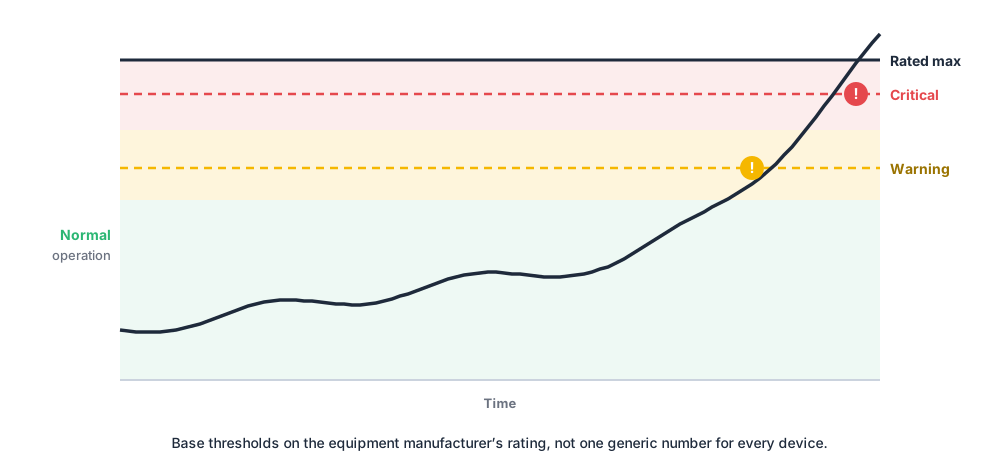
- Configure alarm thresholds based on the equipment's rated temperature.
- Connect the system to a meter, SCADA platform, or cloud dashboard for ongoing visibility.
10. What Are the Maintenance Requirements for a Wireless Busbar Sensor System?
| System Type | Maintenance Requirement |
|---|---|
| LoRa / Zigbee battery-based | Battery check or replacement every 1–3+ years, depending on usage |
| Passive RFID-based | No battery maintenance required |
| Readers / antennas (either type) | Periodic visual inspection and firmware updates |
11. How Many Sensors Do I Need Per Busbar or Panel?
As a starting point, place a sensor at every bolted joint, cable lug, and plug-in contact considered a hotspot risk — commonly one sensor per phase per joint. A qualified electrical engineer should confirm the final sensor count based on your specific switchgear layout and risk assessment.
12. What Temperature Threshold Should Trigger an Alarm?
Set thresholds relative to the equipment manufacturer's maximum rated operating temperature — typically a warning level below the rated limit and a critical alarm at or just under it, rather than applying one generic number across every type of equipment.
13. How Does Wireless Busbar Monitoring Integrate With SCADA or Cloud Platforms?
Most systems pair a local meter or gateway with the sensors, which forwards readings to a SCADA system, building management system, or cloud dashboard over standard industrial protocols or network connections — giving remote visibility and automated alerting alongside your other plant data.
14. How Do I Choose the Right Wireless Busbar Temperature Monitoring Solution?
- Prioritize a battery-free design if the busbar is hard to access.
- Confirm the operating temperature range and mounting type match your equipment.
- Check the wireless read range against your actual panel layout.
- Verify integration with the alerting, SCADA, or BMS platform you already use.
15. Why Choose Amptronics for Busbar Temperature Monitoring?
Amptronics builds battery-free, passive wireless temperature sensors purpose-built for busbars, switchgear, and RMU contacts, giving maintenance teams continuous, real-time visibility into exactly the joints most likely to fail — without adding a battery-replacement task to their workload.
- Battery-free RFID design — zero recurring sensor maintenance
- Continuous, real-time readings with configurable alarm thresholds
- Bolt-on and clamp mounting options for common busbar and contact geometries
- Built for industrial switchgear, panel, and substation environments
Still Have Questions About Busbar Temperature Monitoring?
Every switchgear layout is different, and the right sensor, mounting type, and alarm configuration depend on your specific equipment. Talk to Amptronics for guidance tailored to your facility.
Talk to Amptronics About Your Switchgear